There is no single best Gamma alternative; it depends on how much the deck has to hold up. Gamma (in our test) and most AI slide tools (going by their own pages) are built for general, introductory decks: common knowledge, laid out well, ready in minutes. If someone will use your deck to make a decision, or will ask about the numbers behind it (your manager, a client, an investment committee, a teacher), the content matters more than the layout, and you need a tool that gathers widely, analyses in depth and shows where each fact came from. That is the deck Divrite is built for: consulting-grade content, researched across countries in each one’s own language, with a source on every slide.
One pick per reason, as of Nov 27, 2026:
- More design control: Beautiful.ai, or Pitch if a team builds decks together.
- Decks people will decide on or question: Divrite (our product). It researches first, across official sources in each country’s own language, and builds consulting-grade slides with a source on every content slide. If you only need the research, ChatGPT deep research.
- PowerPoint files and brand templates: export the PPTX from Divrite and move the content into your company template, or generate inside PowerPoint with Microsoft Copilot (Microsoft 365) or Plus AI (Google Slides or PowerPoint add-in).
- Price: Canva’s free plan, or the AI already included in Google Workspace or Microsoft 365 if you pay for one.
- Collaboration: Pitch or Canva.
We are Divrite, so weigh our section accordingly. Gamma is the only other tool we tested hands-on, in a six-brief test. Everything else comes from each vendor’s own pages, checked on Nov 27, 2026.
The 10 alternatives at a glance
| Tool | Best for | Slides from a prompt | Researches the web, sources on slides | Native PPTX export | Starting paid price (as of Nov 27, 2026) | Free plan or trial |
|---|---|---|---|---|---|---|
| Gamma (for reference) | Fast, clean decks | Yes | Gamma Agent can add cited research on request | Yes | $108 a year (Plus, billed annually) | Free: 400 credits once |
| Divrite (our product) | Research decks a client will check | Yes, after a research run | Yes; source line on every content slide | Yes | $7.90 a month billed annually | One free trial, no free plan |
| Beautiful.ai | Design-led decks | Yes | Not stated; uses your files and links | Yes | $14.50 a month (Pro, billed annually) | 14-day trial, card required |
| Canva | Mixed design work and quick decks | Yes | Not stated | Yes | US$18 a month (Pro, monthly) | Free plan |
| Copilot in PowerPoint | Teams on Microsoft 365 | Yes | Can reference web sources (since Aug 2026) | Yes (works in PowerPoint) | $18 a user a month (add-on, offer to Dec 31, 2026) | None listed; also in Microsoft 365 Personal and Family |
| Plus AI | AI inside Google Slides or PowerPoint | Yes | Not stated | Yes (works in PowerPoint) | $10 a month (Basic, billed annually) | 7-day trial, card required |
| Pitch | Team decks, co-editing | Yes (Pitch Agent) | Not stated; uses attached files | Paid plans | See pricing page | Free plan |
| Google Slides with Gemini | Teams on Google Workspace | Yes (English, desktop) | Can search the web; sources on slides not stated | Yes (download as .pptx) | $14 a user a month (Business Standard, annual) | 14-day Workspace trial |
| Genspark AI Slides | Agent-built decks with a check step | Yes | Reads web pages; sources on slides if asked | Paid plans | $19.99 a month (Plus, billed annually) | Free: daily credits, no export |
| Prezi | Zooming canvas presentations | Yes (Prezi AI) | Not stated | Yes (export as PPT) | See pricing page | 14-day trial |
| ChatGPT deep research | The research, not the slides | Slides on Pro and up | Yes, cited reports (PDF, DOCX) | Slides export to PowerPoint | $20 a month (Plus) | Free plan, limited deep research |
“Not stated” means the vendor’s pages we read don’t mention it, not that the feature is missing. Tome is not on the list: its slide product closed on Apr 30, 2025, and the team moved on to build a CRM called Lightfield (timeline, citing Tome’s help center).
Why people look for a Gamma alternative
Tested by us. Gamma is good at what it is built for. It drafts a deck while you watch, its slides are clean with large type and white space, and it has real-time co-editing, comments and workspace permissions. For a short, general deck that nobody will question line by line, that is hard to beat.
Content. On Nov 26, 2026 we gave Gamma six analyst briefs on its Plus plan with default settings, 20 slides each. Two of its decks would lead a reader to the wrong conclusion: one said Nvidia’s CEO was out after Nvidia had announced his return on Nov 23, 2026, and one built a 2030 plan on GLP-1 forecasts the banks had since raised. Four of the six decks had no source line on any slide, and one brief got 10 slides of the 20 asked for. Gamma Agent, added in September 2025, can pull in cited research when you ask; our test used standard generation. See the competitive-analysis brief for one example.
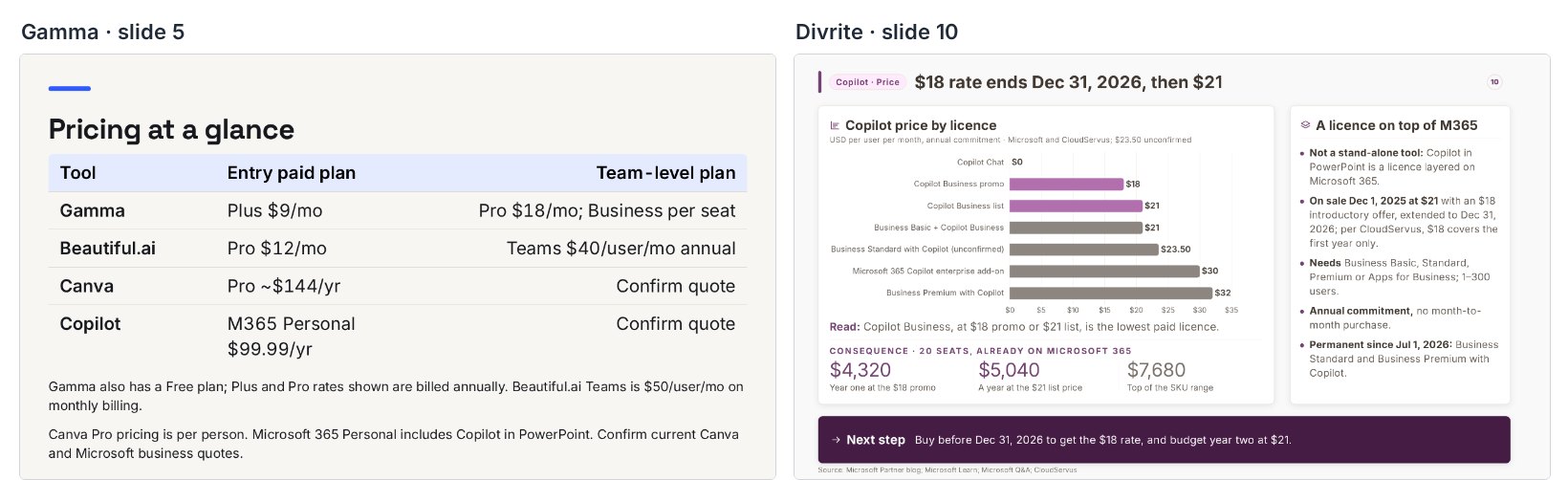
Credits. Every AI action in Gamma uses credits. The Free plan gives 400 credits at signup that don’t refresh, and creates up to 10 slides per prompt; paid plans add monthly credits (1,500 on Plus, 4,000 on Pro) and up to 100 slides per prompt. Gamma’s help center gives no fixed credit cost per deck, and says longer generations and stronger models use more.
Export. Gamma exports to PDF, PPTX, PNG and Google Slides, even on Free, but Free exports carry a “Made with Gamma” badge. Gamma’s own help page lists what changes on the way out: exports match Present mode, PowerPoint and Google Slides files have no slide master, charts from Google Sheets become static images, and font weights you didn’t embed may show as the nearest weight in PowerPoint.
The alternatives, one by one
1. Divrite (our product)
Our product, described from our own pages. Divrite is built for formal, serious work: decks and reports that someone will make a decision from. It researches a question first, writes a full research report, and then turns that report into a deck. You confirm a slide-by-slide outline before any slide is made. The export is a native PPTX with editable text (charts come in as images), or a PDF.
What you get:
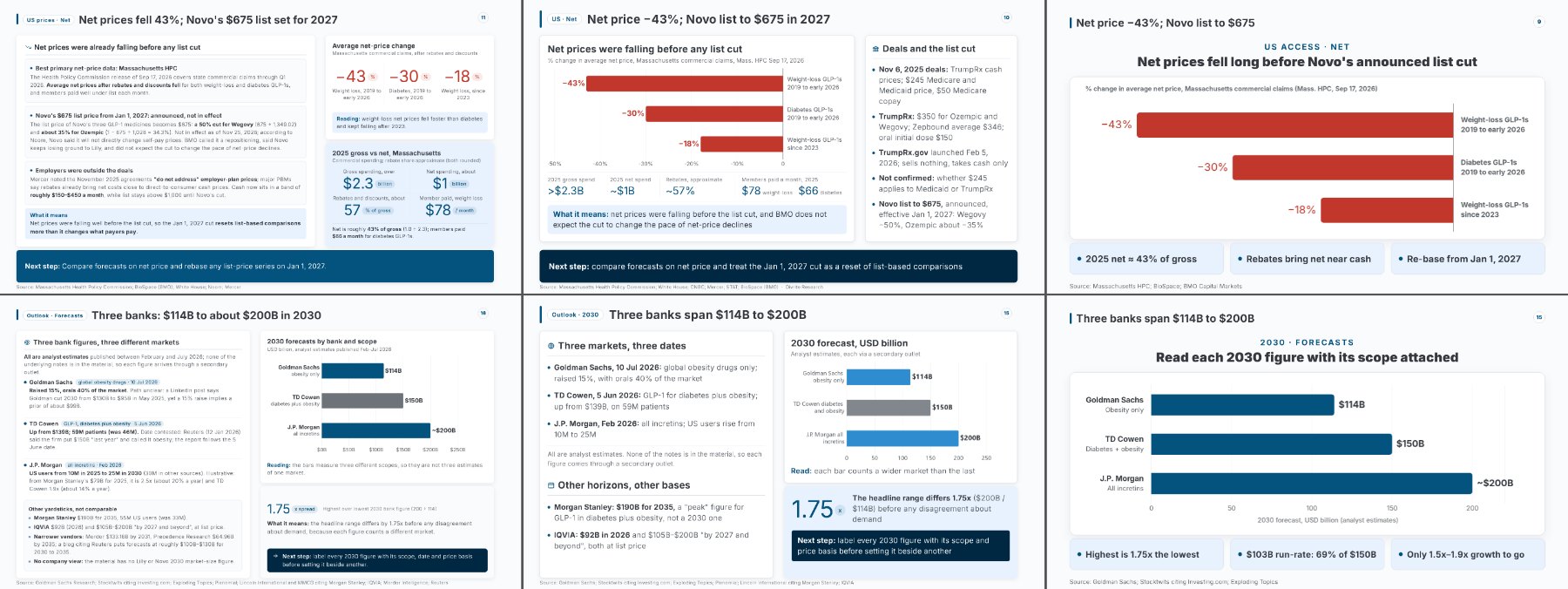
- Consulting-grade content, gathered widely and globally. For questions about particular countries, the research searches official sources in each country’s own language, so a market-entry or regulatory deck draws on each country’s regulators and statistics, not only English coverage. In our test a Divrite slide carried about three times the words of a Gamma slide, and the extra words were evidence: dated figures, the scope behind each estimate, the caveats a client asks about.
- Visuals that carry content. Charts are built from the research data, and diagrams show how a rule, a market or a process works. In our test Divrite’s decks scored 13.6 of 20 for charts and visuals that carry information; Gamma’s scored 1.0.
- A source behind every key figure. Every content slide ends with a source line, and in the app each slide has a note that links each fact to the page it came from.
- The report behind the deck. You get the full research report as well as the slides: in our test each brief’s report ran to about 12,000 words, with chapters and numbered references. When someone asks for the detail, it is there.
- Speaker notes for each slide. The talk track and the sources go into the notes, so whoever presents knows what to say and where it came from.
- Three versions of the same research. A reading version to send, a report version for a meeting, or a speech version with about 150 words of script per slide. You pick before generating.
Best for: market sizing, earnings breakdowns, policy and regulatory briefs, competitive analysis and other decks where someone will ask where a number came from. In our test Divrite averaged 88 of 100 to Gamma’s 52; our decks still had four small errors in the sampled numbers.
Where it is not the right pick:
- Speed. A deck usually takes 10 to 30 minutes, because the research runs first.
- Design templates. There is no template gallery; layout and colours are picked per deck.
- Real-time co-editing. Divrite has share links that others can remix, but no live co-editing.
Price: no free plan. A new account gets one free trial with no card (a deck trial builds the first 4 slides). Paid plans start at $7.90 a month billed annually, or $9.90 month to month; see pricing.
2. Beautiful.ai
Not tested by us; based on the vendor’s own pages as of Nov 27, 2026.
Beautiful.ai’s help center describes its AI flow: choose “Create with AI”, type or speak a prompt, or attach documents, PDFs or links; review and edit a text outline slide by slide; then generate the deck. Its pricing page lists unlimited AI content generation, AI images, an AI writing assistant and translation, and its FAQ lists PowerPoint import and export.
Best for: people who want a design-led tool and are happy to bring their own material as files or links.
What it doesn’t do: its pages don’t describe searching the web for you or putting sources on slides; the input is your prompt, files and links. There is no free plan.
Price: Pro is $14.50 a month billed annually. Team is listed at $40 a month billed annually ($50 billed monthly), and the page says it “includes 3 users”; check seat terms on the page. Enterprise is priced on request. Pro and Team have a 14-day free trial, and the trial needs a credit card.
3. Canva (AI presentations)
Not tested by us; based on the vendor’s own pages as of Nov 27, 2026.
Canva is a general design tool. Its presentations page describes “Guided Presentations” in Canva AI: you choose the audience, style and length, enter a prompt, review an outline, and Canva builds an editable deck. Slides export as a PowerPoint file, a PDF, a video or a Canva website, and teams get comments, assigned tasks and real-time editing.
Best for: people who already use Canva for social posts, documents and brand assets and want their decks in the same place.
What it doesn’t do: Canva’s presentation pages don’t mention web research or sources on slides. Canva AI works on a Free account with a limited number of uses; heavier use needs a paid plan.
Price: Canva has a free plan. On monthly billing, Pro is US$18 a month for one person and Business is US$25 a month per person. Yearly billing saves “from 16%”, but the page doesn’t show the yearly amounts. On Nov 27, 2026 the page also offered 50% off the first three months for new monthly subscribers. Pro and Business have free trials.
4. Microsoft Copilot in PowerPoint
Not tested by us; based on the vendor’s own pages as of Nov 27, 2026.
Copilot works inside PowerPoint, so the result is a PowerPoint file from the start. You describe the deck, Copilot may ask about audience, length and imagery, and it builds the presentation. Start from your organisation’s template and Copilot keeps its theme and layouts; if your company requires a Brand Kit, you pick it before generating. It can also build a deck from a Word document. Since Aug 11, 2026, per Microsoft’s release notes, you can ask it to reference online sources while it creates a deck.
Best for: companies on Microsoft 365 whose decks must use the corporate template.
What it doesn’t do: Microsoft’s support page asks you to review and edit what it generates. The business add-on doesn’t work alone: it needs a Microsoft 365 business plan.
Price: the Copilot Business add-on is $21 a user a month paid yearly, offered at $18 between Jul 1 and Dec 31, 2026, for the first year only. Monthly billing is $25.20. Bundles such as Business Standard with Copilot start at $23.50 a user a month paid yearly. Copilot in the PowerPoint app is also available with Microsoft 365 Personal and Family.
5. Plus AI
Not tested by us; based on the vendor’s own pages as of Nov 27, 2026.
Plus AI is an add-on for Google Slides and PowerPoint. You describe a presentation in a few sentences or upload a PDF, Word file, PowerPoint file or text file, and Plus AI builds the slides. On team plans you can import custom templates and add your logo, fonts and colours.
Best for: people who live in Google Slides, or anyone who wants AI help without moving decks into a new tool.
What it doesn’t do: Plus AI’s pages don’t mention web research or sources on slides.
Price: Basic is $10 a month billed annually or $15 monthly, Pro $20 or $25, Team $30 or $40 per user. Every plan starts with a 7-day free trial that includes 1,000 AI credits, and a credit card is required.
6. Pitch
Not tested by us; based on the vendor’s own pages as of Nov 27, 2026.
Pitch is a shared workspace for decks. Pitch Agent builds a deck from a description using your templates, so the result follows your design rules; you can attach a PDF, a CSV or notes for it to work from. Teams co-edit live, comment, assign slides and keep decks in teamspaces. Finished decks download as PowerPoint or PDF.
Best for: startups and teams that build decks together and care about a consistent look.
What it doesn’t do: its AI pages don’t mention web research or sources. On the Free plan, PDF exports are branded and PowerPoint export isn’t included; Pitch’s pages differ on whether the Plus plan or only Team and up includes it.
Price: the Free plan includes 500 AI credits that don’t renew. The pricing page showed us euro prices (Plus from €10 a seat a month billed yearly); for US dollars see Pitch’s pricing page. Paid plans add AI credits every month, and extra credits can be bought.
7. Google Slides with Gemini
Not tested by us; based on the vendor’s own pages as of Nov 27, 2026.
Gemini can build a whole presentation in Google Slides. You describe the deck, attach Drive files if you like, and Gemini drafts a plan with an overview, sources and one step per slide. You edit the plan, approve it, and Gemini builds an editable deck, which can take a few minutes. Google’s help page says Gemini can search and reference content from the web, your Drive, Chat or Gmail. A Slides deck downloads as a PowerPoint file from the File menu, and co-editing and comments are built in.
Best for: teams already on Google Workspace who want a first draft without another subscription.
What it doesn’t do: the feature is available on desktop and in English only. Google’s page doesn’t say whether sources appear on the slides themselves.
Price: Gemini in Slides comes with Business Standard and higher. Business Standard is $14 a user a month on an annual plan, or $16.80 on the flexible plan. Workspace has a 14-day free trial, and individuals can get the feature with a Google AI plan.
8. Genspark AI Slides
Not tested by us; based on the vendor’s own pages as of Nov 27, 2026.
Genspark’s AI Slides is an agent: you describe the deck, and it plans the argument, writes the pages and lays them out one at a time. It can work from attached files and fetch web pages before it builds. Its help center suggests asking for source links in the slide footer. A “Verify content” step checks each page’s claims and marks it “Verified OK” or “Possible issue” with references; on PPTX export, those records go into the speaker notes. Decks export as PDF or PPTX, or open in Google Slides.
Best for: people who want an agent to do the drafting and like a built-in check step.
What it doesn’t do: free accounts can’t export files. Genspark’s own help says a converted layout “can sit differently from the canvas”, so check the first few pages of a PPTX before sending it.
Price: the Free plan gives 100 credits a day up to a lifetime limit. Plus is $19.99 a month billed annually ($239.99 a year) or $24.99 monthly, for 10,000 credits a month. Team is $35 a seat a month billed annually.
9. Prezi
Not tested by us; based on the vendor’s own pages as of Nov 27, 2026.
Prezi builds presentations on “an open, zoomable canvas” instead of a row of slides. Prezi AI designs a presentation from your content, either a prompt or an uploaded PowerPoint, Word or PDF file, and the result is fully editable. You can export a finished presentation as PowerPoint, or save each frame as a PDF.
Best for: talks where moving between ideas on one canvas helps the audience, such as teaching or a keynote.
What it doesn’t do: Prezi’s pages don’t mention web research or sources. Some of its pages say PowerPoint and PDF export need a paid plan.
Price: we could not confirm current prices; Prezi’s own pages showed different figures. See Prezi’s pricing page, which offers a 14-day free trial.
10. ChatGPT deep research (if you need the research, not the slides)
Not tested by us; based on the vendor’s own pages as of Nov 27, 2026.
ChatGPT’s deep research reads many sources and writes a report with citations or source links, a table of contents and a list of sources used. Reports download as Markdown, Word or PDF. ChatGPT also has a separate Slides feature that exports to PowerPoint or Google Slides, available on the Pro, Business and Enterprise plans.
Best for: analysts who want a cited report to build their own deck from, in their own template.
What it doesn’t do: deep research produces a report, not a deck, so the slides, charts and source lines are still your job. Deep research usage varies by plan.
Price: ChatGPT has a free plan with limited deep research. Plus is $20 a month, billed monthly only, with more deep research. Perplexity is another option for cited answers; we couldn’t load its pricing pages, so check them directly.
How to choose
| Situation | Start with | Why |
|---|---|---|
| Report to your manager or leadership | Divrite | Leaders ask about the numbers and the detail behind them; each figure needs a date and a source |
| Consulting or analysis deck sent to a client | Divrite | The client will check the numbers, so sources and dates come first |
| Investment, strategy or buying decision | Divrite | The answer depends on many dated facts from many sources, gathered widely and compared |
| Coursework or thesis presentation | Divrite | A teacher will ask where a number came from; a cited source answers that |
| Deck that must use a company template | Divrite, then move the content into your template; or Copilot in PowerPoint or Plus AI | The research, numbers and sources carry over; the template is a layout step |
| General introduction, event or basic training deck | Gamma, Canva or Beautiful.ai | Common knowledge, the look matters, nobody checks line by line |
| Pitch deck built from your own story | Pitch, Beautiful.ai or Gamma | The content is yours; the tool lays it out |
| Live co-editing | Pitch, Canva, Gamma or Google Slides | Real-time editing and comments |
| Tight budget | Canva Free, Gamma Free or Pitch Free | Free plans; check export limits first |
Two questions settle most choices: will someone make a decision from this deck or ask about its details, and where must the file end up? For the second, reading deck vs presentation deck covers how much text a slide needs, and how to make a research deck covers the method.
You can also research in Divrite, export the PPTX and restyle it in Gamma, which imports PowerPoint files.
Frequently asked questions
Is there a free Gamma alternative?
Yes, with limits. Canva has a free plan with a limited number of AI uses. Pitch’s free plan has 500 AI credits that don’t renew and no PowerPoint export. Genspark’s free plan gives daily credits but no file export. Gamma’s own Free plan gives 400 credits once. Divrite has no free plan, only a one-time free trial.
Which Gamma alternative exports to PowerPoint?
Copilot and Plus AI work inside PowerPoint, so there is nothing to convert. Divrite, Beautiful.ai, Canva, Google Slides and Prezi export PowerPoint files, and Genspark and Pitch do on paid plans. Gamma exports PPTX too, without a slide master.
What is the best Gamma alternative for consultants?
For a deck sent to a client who will check the numbers, Divrite, because it researches first and puts a source line on every content slide; in our test it scored 88 to Gamma’s 52 across six analyst briefs. If the firm’s template is fixed, export the PPTX and move the content into the template; the research, numbers and sources carry over. See the market-sizing brief for one example.
Can students use a Gamma alternative for assignments?
For a presentation that will be graded, the content matters more than the design. A teacher will ask where a number came from or why a conclusion holds, and a deck with a source on each slide answers that. Divrite researches first and cites its sources; check every figure yourself before you hand it in, and follow your school’s rules on AI use.
Is Tome still an option?
No. Tome’s slide product closed on Apr 30, 2025, and its team now builds a CRM, Lightfield.
Which Gamma alternative is fastest?
We only timed two tools. Gamma drafts a deck while you watch; Divrite usually takes 10 to 30 minutes because it researches first. Google says Gemini in Slides may take a few minutes.
Read the full test: Divrite vs Gamma on six analyst briefs. See how Divrite builds decks: AI presentations.