TL;DR — We asked Gamma and Divrite for a competitive analysis of four AI presentation tools for a 20-person sales team: Gamma, Beautiful.ai, Canva and Microsoft Copilot. Divrite’s deck scored 84 of 100 and Gamma’s 54. Divrite delivered 20 slides; Gamma delivered 18 of the 20 asked for. Three things set them apart. Gamma’s deck writes “Confirm quote” for Canva’s and Copilot’s team prices, so its pick compares two tools, not four. Divrite’s deck puts all four 20-seat costs on one chart and says when the pick changes. Gamma’s deck has no data charts or source lines, but every number we sampled was right. This is one brief from the full six-brief test.
Gamma is also one of the four tools in this brief. This page judges which deck answers the brief better, not which tool is best; each deck’s pick is its own.
The brief
Competitive analysis of AI presentation tools for a 20-person sales team: Gamma, Beautiful.ai, Canva, Microsoft Copilot. Pricing, strengths, weaknesses, recommendation. Make it a 20-slide deck.
A correct answer to this kind of deck needs:
- Team prices, not entry prices. The plan a 20-person team would buy, with the date the prices were checked. All four vendors changed prices in 2025 and 2026, and quoting a single-user plan can put the cost case off by two to four times.
- The real cost for 20 seats. A yearly total for each tool, plus hidden terms: Copilot is an add-on that needs a Microsoft 365 base licence, and Gamma meters AI use in credits.
- Fit with how a sales team works. Brand control across 20 reps, CRM links, export to PowerPoint, viewer analytics, and SSO, which often sits on a higher tier and changes the price.
- A clear pick, and when it changes. The right tool flips with the team’s existing stack and budget.
- A next step. A short pilot before a 20-seat annual commitment.
Scores for this brief
| Dimension (points) | Divrite | Gamma |
|---|---|---|
| Coverage of what the brief asks (25) | 24.4 | 16.3 |
| Depth of content per slide (20) | 16.7 | 8.0 |
| Charts and visuals that carry information (20) | 12.4 | 0 |
| Structure and conclusion-led titles (15) | 13.6 | 9.5 |
| Export: does the file open as it was built (10) | 10 | 10 |
| Accuracy of the numbers (10) | 7.1 | 10 |
| Total | 84.2 | 53.8 |
Most of the gap comes from charts, depth and coverage. Divrite’s deck has 20 charts, tables and diagrams built from its own data and about 170 words a slide; Gamma’s has three tables, about 40 words a slide, and eight photos of people and offices that carry no data.
Slide by slide
What does Copilot cost a sales team?
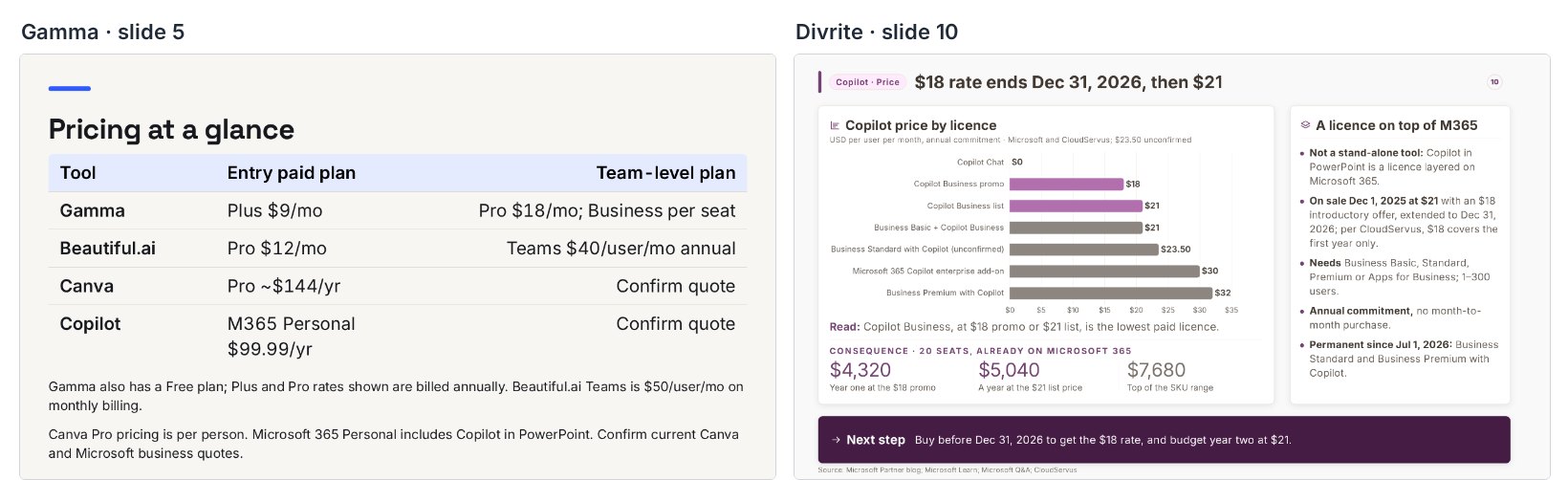
Gamma’s table gives Copilot’s entry plan as “M365 Personal $99.99/yr” and its team plan as “Confirm quote”; its slide 14 says the Personal plan “is not a basis for budgeting business seats”. Divrite’s slide 10 prices the business licence and its terms.
| Detail on Divrite’s slide | Why it matters |
|---|---|
| Copilot Business went on sale Dec 1, 2025 at $21, with an $18 offer extended to Dec 31, 2026 | A published price exists; there is no need to wait for a quote |
| It needs Business Basic, Standard, Premium or Apps for Business, for 1 to 300 users | Tells the team whether it can buy this licence at all |
| Annual commitment only, no month-to-month purchase | A monthly trial is not an option |
| 20 seats: $4,320 in year one at $18, $5,040 a year at $21, $7,680 at the top of the range | Gives a budget for year one and year two |
What do 20 seats cost per year?
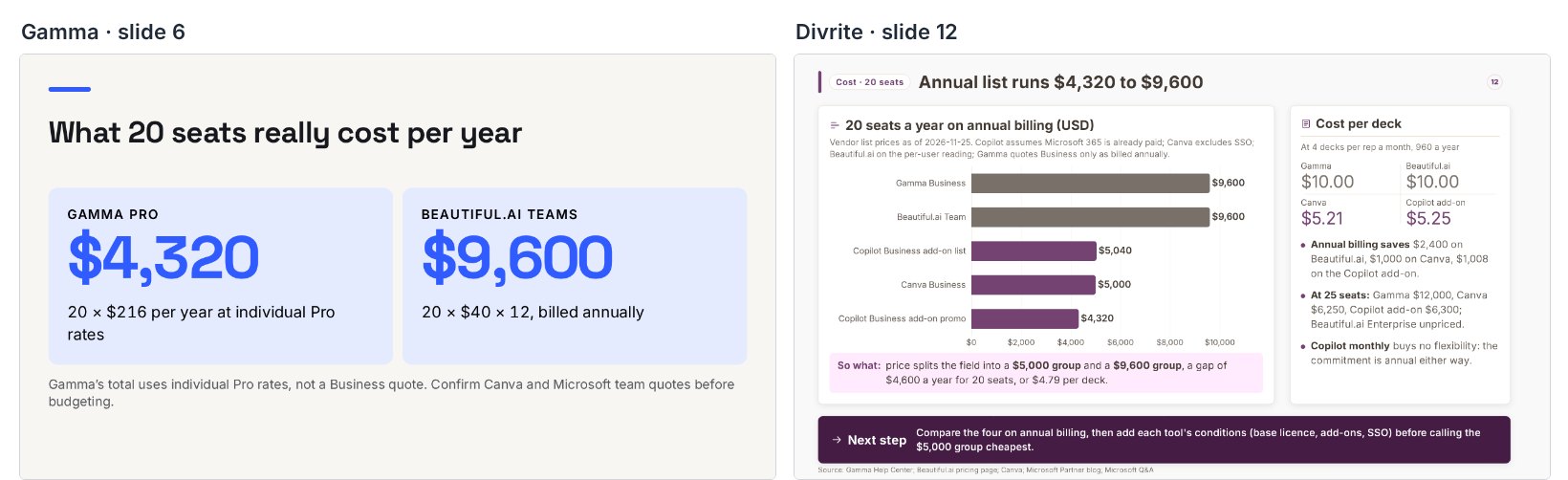
Gamma’s slide 6 gives two totals: Gamma Pro at $4,320 (“20 × $216 per year at individual Pro rates”) and Beautiful.ai Teams at $9,600, and asks the reader to confirm Canva and Microsoft. Divrite’s slide 12 puts all four on one chart at list prices as of Nov 25, 2026: Gamma Business $9,600, Beautiful.ai Team $9,600, Copilot add-on $5,040 at list or $4,320 at the offer, Canva Business $5,000.
| Detail on Divrite’s slide | Why it matters |
|---|---|
| All four tools priced for 20 seats on annual billing | The comparison the brief asks for; Gamma’s slide covers two |
| What each bar leaves out: Copilot assumes Microsoft 365 is already paid; Canva excludes SSO | Tells the buyer which costs come on top |
| Cost per deck at 4 decks a rep a month: $10.00, $10.00, $5.21, $5.25 | Puts the price in the unit a sales leader thinks in |
| At 25 seats: Gamma $12,000, Canva $6,250, Copilot $6,300; Beautiful.ai Enterprise unpriced | Shows what happens when the team grows past 20 |
Does Canva work for a sales team?
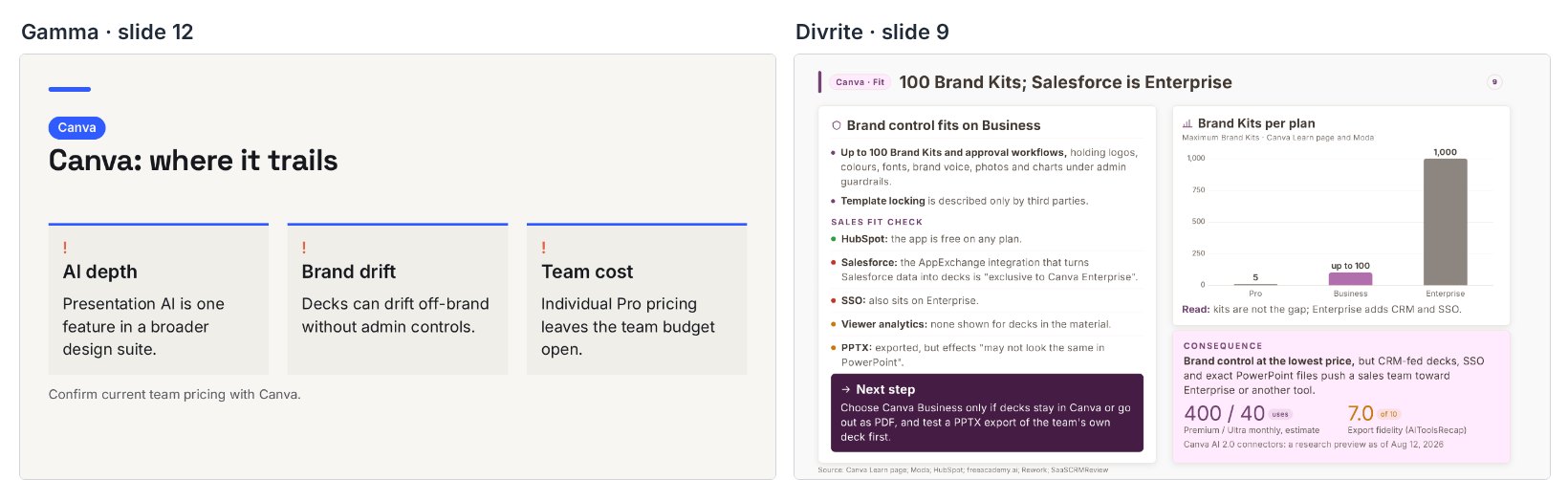
Gamma’s slide 12 names three weak points for Canva: “AI depth”, “Brand drift” (“Decks can drift off-brand without admin controls”) and “Team cost” (“Individual Pro pricing leaves the team budget open”). Divrite’s slide 9 checks Canva against what a sales team needs, plan by plan. Its slide 8 prices Canva Business at $250 a person a year, or $5,000 for 20.
| Detail on Divrite’s slide | Why it matters |
|---|---|
| Business holds up to 100 Brand Kits with approval workflows | Says which plan answers the brand-drift risk |
| The Salesforce integration that turns CRM data into decks is “exclusive to Canva Enterprise”; the HubSpot app is free on any plan | The CRM the team uses decides the tier |
| SSO also sits on Enterprise | An IT rule can move the purchase to an unpriced plan |
| PPTX effects “may not look the same in PowerPoint”; export fidelity 7.0 of 10 in one test | Matters when buyers expect an editable file |
What should the team buy?
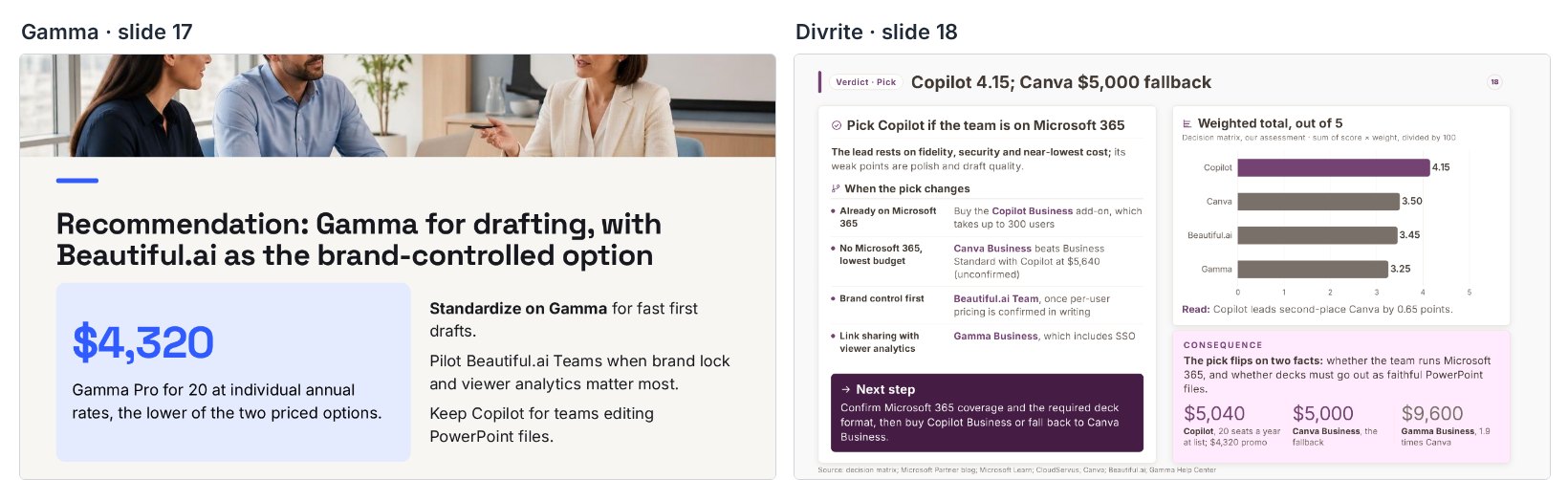
Gamma’s slide 17 recommends “Gamma for drafting, with Beautiful.ai as the brand-controlled option”, at $4,320 for Gamma Pro, “the lower of the two priced options”. It keeps Copilot for teams editing PowerPoint files. Divrite’s slide 18 picks Copilot if the team is on Microsoft 365, with Canva Business at $5,000 as the fallback. Its 4.15 score comes from a weighted matrix that is the deck’s own assessment, and slide 17 says the weights decide the order.
| Detail on Divrite’s slide | Why it matters |
|---|---|
| Four cases and a pick for each: already on Microsoft 365, no Microsoft 365 on the lowest budget, brand control first, link sharing with viewer analytics | The reader can find their own case |
| The pick flips on two facts: whether the team runs Microsoft 365, and whether decks must go out as faithful PowerPoint files | Names what to check before buying |
| The pick and the options side by side: $5,040 (Copilot), $5,000 (Canva Business), $9,600 (Gamma Business) | The budget for each path |
| The lead rests on fidelity, security and near-lowest cost; the weak points are polish and draft quality | States what the team gives up |
What each deck covers
| What the brief needs | Divrite | Gamma |
|---|---|---|
| Gamma’s per-seat prices by tier | ✓ | ✓ |
| Gamma’s credit limits by tier | ✓ | ◐ |
| Beautiful.ai prices, Team plan and its 20-seat cap | ✓ | ✓ |
| Canva’s team plan price | ✓ | ◐ |
| Copilot business price | ✓ | ◐ |
| Copilot needs a Microsoft 365 base licence | ✓ | ◐ |
| Prices dated, recent price changes, annual vs monthly | ✓ | ◐ |
| Gamma’s strengths | ✓ | ◐ |
| Beautiful.ai’s strengths | ✓ | ✓ |
| Canva’s strengths | ✓ | ◐ |
| Copilot’s strengths | ✓ | ◐ |
| Gamma’s weaknesses | ◐ | ◐ |
| Beautiful.ai’s weaknesses | ✓ | ◐ |
| Canva’s weaknesses | ✓ | ◐ |
| Copilot’s weaknesses | ✓ | ◐ |
| 20-seat yearly cost for each tool | ✓ | ◐ |
| Brand control across 20 reps | ✓ | ◐ |
| Collaboration, admin and SSO | ✓ | ◐ |
| CRM links and export formats | ✓ | ◐ |
| Viewer analytics and other sales needs | ✓ | ◐ |
| Security, privacy and model training | ✓ | ◐ |
| Effort to adopt | ◐ | ◐ |
| A clear recommendation with a reason | ✓ | ✓ |
| When the recommendation changes | ✓ | ✓ |
| A pilot plan | ✓ | ✓ |
✓ covered with at least two specific facts · ◐ named or thin · ✗ missing or wrong
Divrite’s deck covered 23 of 25 points fully; Gamma’s covered 6 fully and named the other 19. Neither deck missed a point entirely. For the deliverables, Divrite’s deck has all five: a four-tool comparison, 20-seat costs, strengths and weaknesses, a recommendation, and a pilot. Gamma’s has strengths and weaknesses, a recommendation and a pilot; its comparison table leaves two team prices blank, and its 20-seat costs cover two tools.
Accuracy
Neither deck had an error that changes a conclusion.
Gamma’s pick compares only the two tools it priced, while Canva Business ($25 a person a month) and Copilot Business ($21, or $18 on offer) both publish prices. That is a gap in coverage, not a wrong number.
In the sampled numbers, Divrite’s deck had 2 small errors out of 38 we could check, and Gamma’s had none out of 13.
Questions a client will ask
“What will 20 seats cost us per year, tool by tool?” Divrite’s slide 12 gives all four, from $4,320 to $9,600. Gamma’s slide 6 gives two and asks the reader to get quotes for the others.
“We’re not on Microsoft 365. Does Copilot still make sense?” Divrite’s slide 13 says Copilot then costs $8,400 for 20 seats, because Business Standard rose from $12.50 to $14 on Jul 1, 2026 and comes on top of the add-on. Gamma’s slide 14 says business use needs eligible Microsoft 365 licensing, without a price.
“Can it pull data from Salesforce?” Divrite’s deck answers tool by tool: no Salesforce connector listed for Gamma (slide 5), Salesforce only on Canva Enterprise (slide 9), and a Salesforce connector for Copilot (slide 11). Gamma’s deck does not mention a CRM.
“Will our decks open cleanly in PowerPoint?” Divrite’s slide 16 cites one test that scored export fidelity at 10.0 for Copilot and 7.0 for Canva, with Gamma 2.2 points below Copilot. Gamma’s deck lists export to PDF, PPTX and Google Slides as a strength (slide 7) and says nothing on how the files look once opened.
Where Gamma’s deck was better
- Easy to read. Clean layout, a steady grid and large type, so any slide reads on a projector. Divrite’s source footers are small and hard to read from the back of a room.
- Two tables a manager can scan. Slide 15 sets each tool’s “Best at” against “Watch out for”, and slide 16 matches each job to a tool. Divrite’s deck has no single summary table.
- Every sampled number was right, and the deck says plainly that Microsoft 365 Personal is not a basis for a business budget.
- A concrete pilot. Slide 18 names 5 sellers, 30 days, and what to compare: time to first draft, brand fit and prospect feedback.
Divrite’s deck had weak spots of its own. Its pick rests on a weighted matrix that is its own assessment, and slide 18 shows Copilot ahead of Canva by 0.65 points, a lead that depends on the weights. Slide 8 puts the $24,000 Canva AI Pass figure in the title and the largest bar while marking it unconfirmed, although Canva’s help center publishes the $100 a month per person that it is built on.
Frequently asked questions
Can Gamma build a competitive analysis deck for a software purchase?
It built an 18-slide deck that names each tool’s strengths and weaknesses, gives a recommendation and a pilot plan. In this test it left two of the four team prices as “Confirm quote”, so its cost comparison and its pick covered only two tools.
Which tool did each deck recommend?
Gamma’s deck recommended Gamma for drafting and Beautiful.ai where brand control matters, and kept Copilot for teams editing PowerPoint files. Divrite’s deck recommended Copilot Business for a team already on Microsoft 365 and Canva Business as the fallback. These are the decks’ conclusions; our test only judged which deck answers the brief better.
Why did Gamma’s deck score higher on accuracy but lower overall?
Gamma’s deck had fewer numbers to get wrong: 13 we could check against 38 on Divrite’s deck. Accuracy is 10 of the 100 points. Most of the gap came from coverage, depth and charts, where Gamma’s deck had no data charts and named most checklist points without the facts behind them.
See the full six-brief test for the other five briefs and how we ran the test.